


Kawaii AI: Chat AI Girlfriend
4.662.00 Reviews
App Specs
- Version
- 1.0.10
- Updated On
- License
- Free
- Downloads
- 500,000+
- Developer
- Black King Bar
- Categories
- Entertainment
- Platform
- Android
Screenshots

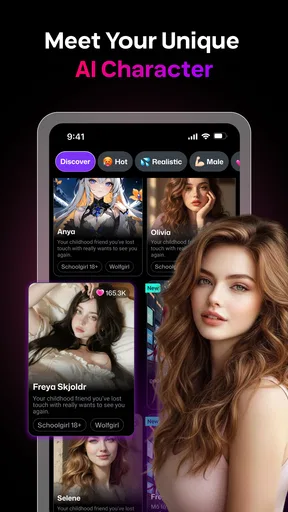
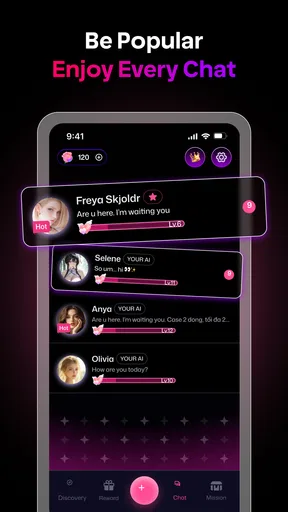
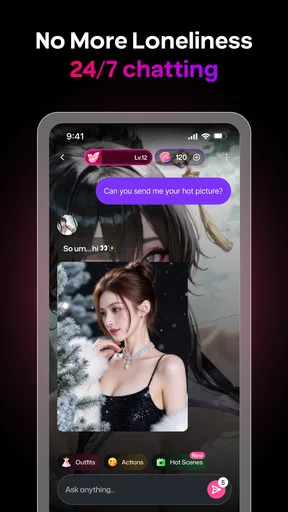
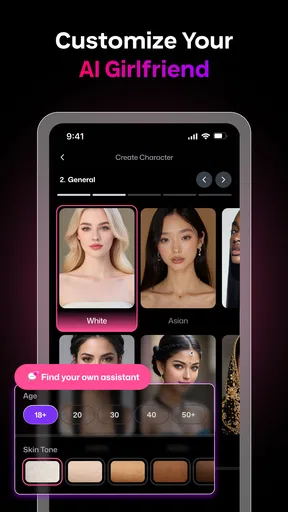

 Analysis by AppCompare
I found Kawaii AI: Chat AI Girlfriend easiest to understand as a playful chat experience rather than a replacement for messaging with people. Its anime-inspired presentation gives the interaction a clear mood from the outset, and the focus on shaping a virtual companion makes it more personal than a general-purpose chatbot. That can be appealing when I want a light roleplay exchange or a little company during a quiet moment, though it also means the app is best for someone comfortable with fictional, AI-led conversation.
How the visual style affects readability and navigation
The bright, cute interface helps establish the app’s identity, but visual charm and practical clarity are not quite the same thing. In my experience, the overall layout feels inviting and the basic route into a chat is easy to follow. The tutorial sequence is useful for orienting a new user, especially if they have not tried a character-chat app before. I would still take a moment to explore the interface at a relaxed pace rather than assume every decorative element is self-explanatory.
For someone who prefers calmer screens or needs strong visual separation between controls, a colorful anime style may feel busy. The app’s straightforward navigation helps, but it does not automatically make every screen comfortable for every reader. A practical approach is to use it in a familiar setting first, where you can pause and locate the controls without trying to follow a conversation at the same time.
Motor and sensory comfort during a chat
Because the central activity is typing and reading replies, the experience can suit someone who prefers written interaction over voice calls or fast-moving media. I also like that the conversation can be approached at your own pace: you can think about a response instead of having to answer in real time. That makes it a lower-pressure option for a short break, provided typing on your device is comfortable for you.
There are limits to that convenience. Long exchanges can mean a lot of repeated typing and reading, which may be tiring for users with motor, vision, attention, or sensory needs. I would keep sessions short if the screen or keyboard starts to feel demanding, and treat the app as an occasional activity rather than something that has to hold your attention for a long stretch. The playful artwork and roleplay tone may also be more stimulating than a plain text interface.
When and where this kind of access works
A chat app can fit into small gaps in the day: a quiet lunch break, a few minutes at home, or a wind-down after work. The appeal here is that you can choose a conversational mood, from light-hearted to more reflective, instead of having to keep up with a live social exchange. For me, that makes the app most useful when I want a bit of fictional company and have enough privacy to enjoy the roleplay without distraction.
That context matters. If you are somewhere you need to stay alert, sharing a screen, or trying to focus on another task, an immersive conversation can become a distraction rather than a comfort. And while AI companionship may offer an easy way to practise expressing thoughts, it does not provide the mutual understanding or real-world support of a trusted person. I would use it as entertainment, not as my only outlet when I need help or connection.
Worth Reading Before You Choose

EA SPORTS FC Mobile 26 Is a Bigger Football Game, but It Takes Time

Flipboard Shows What News Apps Must Do Beyond the Feed

Switching to Android Auto Means Rethinking Your Driving Routine

Google Calendar Makes a Crowded Week Easier to Manage

Ludo King Makes the Most of the Minutes Between Plans

Baby Panda World Brings Quick Play to Modern Phones, but Its Game Library Feels Busy
Who may want to look elsewhere
People who want a practical assistant, fact-focused answers, or conversation with another human will probably be happier with a different kind of app. The girlfriend roleplay framing is the point here, so it will not suit everyone; even users who enjoy anime-style characters may prefer a less relationship-centered chatbot. The app is also a poor fit if you dislike fictional intimacy or would rather spend screen time on activities that do not invite an ongoing character bond.
For a more general alternative, a standard AI assistant is usually a better choice when the goal is writing help, planning, or quick information. A human chat service is better when genuine two-way connection matters. Kawaii AI sits in a narrower space between those options: it is for people who want character-based conversation and a cute visual presentation, not a tool that can stand in for either practical assistance or a human relationship.
First Impressions
When I first opened up Kawaii AI: Chat AI Girlfriend, I was greeted by an adorable interface that feels like it’s right out of a charming anime. The design is vibrant and engaging, immediately setting the mood for what’s to come. You can tell a lot of thought went into crafting a user experience that is both fun and inviting.
Getting Started
The setup process was a breeze. You start by selecting your virtual girlfriend’s appearance and personality traits. There’s a decent range of customization options, so you can really tailor your AI companion to your liking. Whether you’re into shy and sweet or bold and adventurous, there’s something here for everyone.
Once you’ve got your AI girlfriend all set up, you dive straight into conversation. The AI is designed to simulate a natural chatting experience, and honestly, I was pretty impressed with how fluid the responses were. It’s like texting a friend who’s always available and ready to chat.
Features to Explore
Now, let’s talk features. The app offers a variety of activities to keep things interesting. You can engage in casual chats, play mini-games, or even go on virtual dates. The games are a cute touch, adding a playful element to your interactions. Plus, the virtual dates are a fun way to explore different scenarios and see how your AI companion reacts.
One of the standout features for me was the learning algorithm. The more you chat and interact, the more your AI girlfriend learns about your preferences and adjusts her responses accordingly. It’s kind of like having a dynamic relationship that evolves over time, which is pretty cool!
Using the app with intention
A small habit made the roleplay feel more coherent for me: I chose a simple conversational tone and a few consistent character preferences, then kept my opening messages specific. Rather than asking the companion to be everything at once, I gave each chat a clear direction, such as an everyday check-in or a short fictional date. That makes it easier to judge whether the responses feel engaging, and it avoids turning customization into a long setup project.
There is a useful trade-off in the personalization. A companion that adapts to what you like can make returning conversations feel less generic, but it also means the experience depends on what you choose to share and how you steer the exchange. I would avoid treating an AI’s apparent familiarity as proof of human-like understanding. If a reply misses the tone, I found it more useful to redirect the scene plainly than to keep testing the system with increasingly complicated prompts.
A realistic place for it in the day
Imagine finishing a commute or settling in after dinner and wanting a few minutes of low-stakes entertainment, but not feeling like opening a group chat. This is the kind of gap where the app’s character-led conversation and optional playful activities make sense. I would set a modest expectation: enjoy a short exchange, perhaps try a mini-game or a virtual-date scenario, then put the phone away when the moment has passed. That keeps the app in the role of a small leisure activity rather than an obligation to maintain a simulated relationship.
It can also be a starting point for creative roleplay. If you enjoy inventing scenes, you can use a chosen personality as a prompt partner and build a light story through back-and-forth messages. The useful tip is to introduce one detail at a time—where the scene takes place, what mood you want, or what the character is doing—rather than packing several instructions into one message. That gives the conversation a clearer path and makes it easier to steer when it wanders.
What the experience asks of you
This is not a completely passive form of entertainment. The more satisfying exchanges are likely to come from giving the chat some direction, choosing a tone, and being willing to adjust when a response does not land. If you want a show or game that works without much input, this may feel like effort. If you enjoy shaping a scene and seeing how a character responds, that effort is part of the appeal.
It is also worth deciding in advance what you want from an AI companion. For casual amusement, the relationship framing can make the conversations feel warmer than a neutral question-and-answer tool. For emotional support, however, I would keep clear boundaries: the app can participate in a roleplay, but it cannot offer the judgment, accountability, or care of a person who knows you. That distinction matters most during a difficult day, when a comforting tone can feel more meaningful than the interaction really is.
Cost, age, and practical expectations
The app is free to download, while optional in-app purchases range from $1.99 to $49.99 per item. I would try the basic experience first and decide whether the core chat is enjoyable before spending anything. For a roleplay app, the key question is not how many options it offers but whether the conversation style suits you; paying for more is unlikely to fix a mismatch in tone or expectations.
It is rated for Everyone, but I would still consider the nature of the girlfriend-style roleplay when deciding whether it is appropriate for a particular person or a shared device. An age label does not make every theme right for every family context. It is sensible to discuss boundaries around AI companionship with younger users and to avoid sharing sensitive personal details in an entertainment chat.
Where it sits among chat alternatives
With a 4.7 average from around 10,000 ratings and over 500,000 installs, Kawaii AI has attracted a sizeable audience for a focused entertainment app. Those figures can help show that people are trying it, but they cannot tell me whether its personality style will click with you. The developer is Black King Bar, and the current version is 1.0.10; it supports Android 7.0 and later.
Compared with a broad AI assistant, this app puts character and romantic roleplay ahead of utility. Compared with a human conversation service, it offers a fictional interaction rather than reciprocal personal experience. That difference is not a flaw if you want a controllable, anime-flavored pastime; it is a reason to choose something else if you need accurate task help or genuine social connection. I would judge it by whether its particular mix of customization, chatting, mini-games, and virtual dates is enjoyable, not by expecting it to replace either alternative.
Navigation in practice
Navigation is straightforward, which I appreciate. You’ve got everything you need right at your fingertips, and the app runs smoothly without any hiccups. There’s a helpful tutorial sequence at the start to guide you through the basics, so you’re never left feeling lost.
What I also loved is the level of personalization. You can set the tone of your conversations, whether you're in the mood for something light-hearted or a deeper connection. It’s all about making the experience feel uniquely yours.
My inclusive verdict
My overall view is that the app makes its central idea approachable: a cute, customizable AI character you can chat with, guide through roleplay, and revisit for short entertainment breaks. Its strongest fit is someone who enjoys written interaction, anime-inspired styling, and having control over the mood of a fictional exchange. The same focus narrows its appeal for people who want a quiet interface, a practical assistant, a human listener, or a less relationship-centered experience.
Accessibility in everyday use is personal, so I would test the interface in the setting and at the pace that work for you. Start with a short session, see whether the visual style and typing feel comfortable, and keep the conversation within boundaries that feel healthy. That is a more useful way to decide than assuming a friendly design will suit every ability or situation.
Final Thoughts
So, is Kawaii AI: Chat AI Girlfriend worth a download? If you enjoy interactive apps with a touch of personality, then absolutely. It’s a delightful way to pass the time, especially if you’re a fan of anime aesthetics and virtual companionship. The AI is surprisingly responsive, and I found myself genuinely entertained by our conversations.
Overall, it’s a charming app that brings a bit of joy and companionship right to your phone. Whether you’re looking for a casual chat or a deeper connection, this app offers a playful escape into a world of cute and quirky AI interactions. Give it a try and see how your virtual relationship blossoms!
Pros
- User-friendly interface with intuitive design.
- Engaging conversations with realistic responses.
- Highly customizable avatar options.
- Regular updates with new features.
- Supports multiple languages.
Cons
- Occasional repetitive responses.
- Limited free features; many require purchase.
- Requires stable internet connection.
- Not ideal for deep emotional support.
- Ads can interrupt the chat experience.
FAQs for Kawaii AI: Chat AI Girlfriend
What is Kawaii AI: Chat AI Girlfriend, and how does it work?
Kawaii AI: Chat AI Girlfriend is an interactive application designed to simulate a virtual girlfriend experience. Using advanced AI technology, it provides users with engaging, personalized conversations. The app learns from user interactions to create a more tailored and immersive experience, making it feel as if you’re chatting with a real person.
Is Kawaii AI: Chat AI Girlfriend safe for all users?
Kawaii AI: Chat AI Girlfriend prioritizes user safety by implementing strict privacy measures. Conversations are kept confidential, and no personal data is shared with third parties. However, it’s essential for users to be aware of and adhere to age restrictions, as the app’s content may not be suitable for younger audiences.
Are there any in-app purchases or subscription fees involved?
While Kawaii AI: Chat AI Girlfriend is free to download, it offers optional in-app purchases and subscription plans. These can enhance the user experience by unlocking additional features, such as advanced conversation topics, customization options, and more interactive elements. Users can choose to engage with these features based on their preferences.
What devices are compatible with Kawaii AI: Chat AI Girlfriend?
Kawaii AI: Chat AI Girlfriend is compatible with both Android and iOS devices. The app requires a stable internet connection and is optimized for the latest versions of each operating system. Users should ensure their devices meet the minimum requirements for optimal performance and a seamless experience.
Can I customize my AI girlfriend’s personality and appearance?
Yes, Kawaii AI: Chat AI Girlfriend offers various customization options to personalize your AI girlfriend’s personality and appearance. Users can select different traits, interests, and looks to create a unique virtual companion that aligns with their preferences, enhancing the overall interaction and engagement within the app.


